Parameters
Parameters are data passed to the report generator from outside. The application that runs the report passes information as parameters to the NCReport object using the NCReport::addParameter(…) method. Parameters are mostly used in SQL queries and in data, template, and script expressions. Fields can also use the Parameter source type, so parameter values can be printed directly in the report.
Parameter Syntax
To embed a parameter into a query or an expression, use the following syntax:
$P{parameterID}Example of using a parameter in an SQL query:
SELECT productId, productName FROM db.products WHERE primaryKey=$P{parameterID}Example of using a parameter in a script expression:
"$P{firstname}" + "$P{lastname}"Example of using a parameter in a data template expression:
Dear $P{firstname} $P{lastname},Testing Parameters
The following example uses the SQL data source of the report built in the Designer part of this book. To modify the SQL query, select . Modify the SQL query of the data source as follows:
SELECT ProductID, ProductName,
QuantityPerUnit, UnitPrice, QuantityPerUnit*UnitPrice as value
FROM products
WHERE ProductID > $P{prodID}
ORDER BY ProductName
Then add a parameter with the ID prodID to the report. The report runner dialog of NCReport Designer lets you add parameters for testing. To open the runner dialog, select . Click the Add button, set the name to prodID, and set the value to 70. After running the report to the preview, you get the following result:
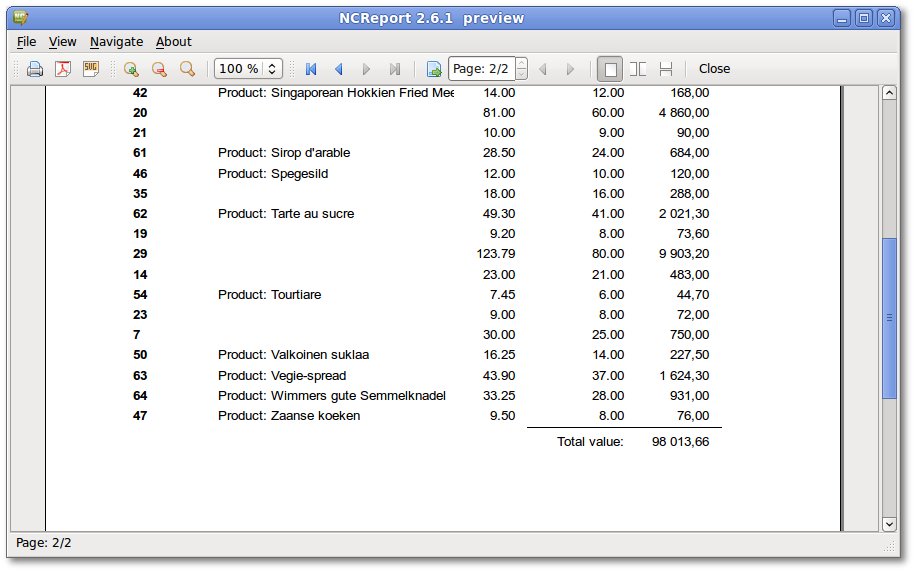
Parameters are evaluated in SQL queries, scripts, and print when expressions in all reports. Design-time parameters can also be managed using the dialog.